Find the tender. Price it. Send it before it closes.
Yebo matches live South African tenders to your trade, reads the BOQ into lines and checks your compliance papers before you submit, so paperwork is not the reason you lose.
Part of The Industry King plan, R499 a month. Works on your phone or laptop.
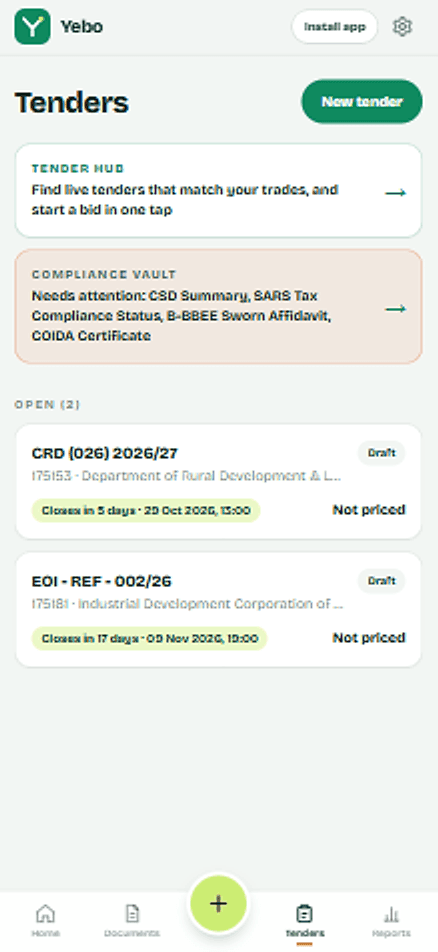
Most bids do not fail on price. They fail on paperwork.
One missing or expired document and a good bid can be thrown out before anyone reads your rates. Yebo keeps these four in one place and tells you what needs attention.
- CSD summary
- Proof you are registered on the Central Supplier Database, with your MAAA supplier number.
- SARS tax compliance status
- Shows your tax affairs are in order. It must still be valid on the day you submit.
- B-BBEE sworn affidavit
- Your ownership and turnover declaration, used for preference points.
- COIDA letter of good standing
- Shows your workers' compensation is up to date.
From tender alert to sent bid
Step 1
Find it
Live eTenders are matched to your trade and province. Closed tenders disappear on their own.
Step 2
Open the bid
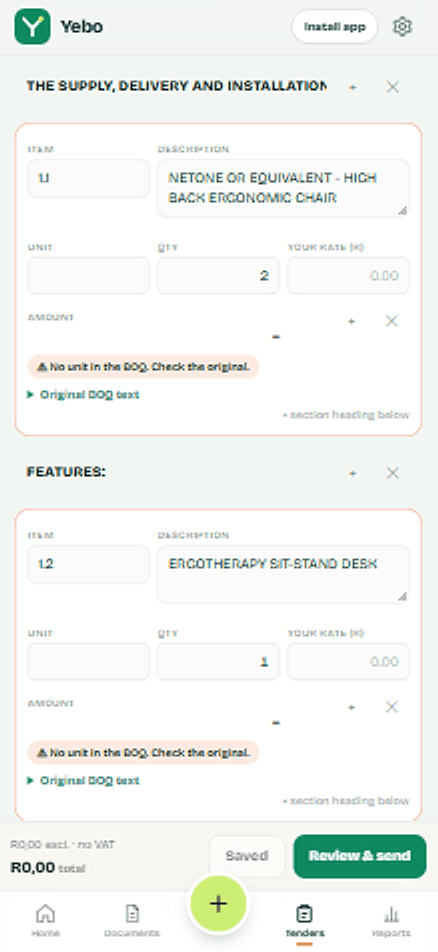
Yebo reads the BOQ (Excel or PDF) into line items, quantities and section headings.
Step 3
Price it
Fill in your rates, or fill from rates you used before. Anything Yebo is unsure about is flagged so you can check the original.
Step 4
Send it
The vault checks your documents, then your priced bid and compliance files go out in one email.
Try it: tap each paper to mark it ready
Supply and install office partitioning
Example Department of Public Works
Compliance vault 0 of 4 ready
Tap each paper to mark it ready. This is how Yebo stops an incomplete bid leaving your phone.
How to bid for a government tender in South Africa
The same six steps apply whether you use Yebo or not. Get the first four sorted once and every tender after that is faster.
Register on the Central Supplier Database (CSD)
Registration is free and gives you the MAAA supplier number every government buyer asks for. Keep your summary report up to date.
Get your SARS tax compliance status
Request it on SARS eFiling. Buyers check that it is valid when the tender closes, so note its expiry date.
Get a B-BBEE certificate or sworn affidavit
Small businesses usually submit a sworn affidavit. It is what earns your preference points.
Get your COIDA letter of good standing
Issued by the Compensation Fund once your registration and payments are in order. It expires, so check the date.
Find the tender and read the BOQ
Tenders are advertised on the National Treasury eTenders portal and on department and municipality websites. The Bill of Quantities lists every item you must price.
Price every line and submit before it closes
Late bids are not considered. Submit the way the tender says, for example by email or in the tender box, and keep proof that you sent it.
- Live eTenders matched to your trade and province
- Excel and PDF BOQs read into editable line items, including very big ones
- Every line keeps its original text, so you can check it
- Compliance vault for CSD, SARS, B-BBEE and COIDA
- Bid and compliance files sent in one email, after you approve
- Quotes, invoices, voice quotes and PayFast payments too
What Yebo does not do. It helps you avoid being disqualified for missing paperwork. It cannot promise you will win, and it does not fill in the tender’s own forms. Always compare your bid with the original tender documents before you submit.
Tender questions
What people ask before they trust a tool with a bid.
Where do the tenders come from?
Public tenders published on National Treasury's eTenders portal. Yebo reads new tenders every morning, and tenders that have closed are removed automatically. Always confirm the details and closing time on the tender documents themselves.
Do I need to be on the CSD already?
Yes. Government buyers expect a Central Supplier Database registration, which is free and gives you a supplier number starting with MAAA. Yebo keeps your CSD summary in the vault and flags it if it is missing.
What if Yebo misreads a line in the BOQ?
Excel BOQs are read exactly. PDFs are read by AI, so any line it is unsure about is marked, and every line keeps its original BOQ text so you can compare in seconds. You can change any line before you send.
Does Yebo fill in the tender forms for me?
No. Yebo prices the schedule and sends your compliance documents with it. Declaration forms and any other forms the tender asks for still need to be completed and signed by you.
Will Yebo send a bid without my approval?
Never. Auto-draft only opens a draft for tenders that match your trade. You check the lines, add your rates and approve. You can also email yourself a test copy first.
Can I use it on site?
Yes. Yebo works in desktop and mobile browsers and installs on your phone like an app.