Write the quote in a few minutes
Say the job out loud, check the draft, send it. Most of the time on a quote goes on typing and second guessing. Yebo takes the typing off you and points out what is missing, and you stay in charge of every price and every word.
- Voice quotes
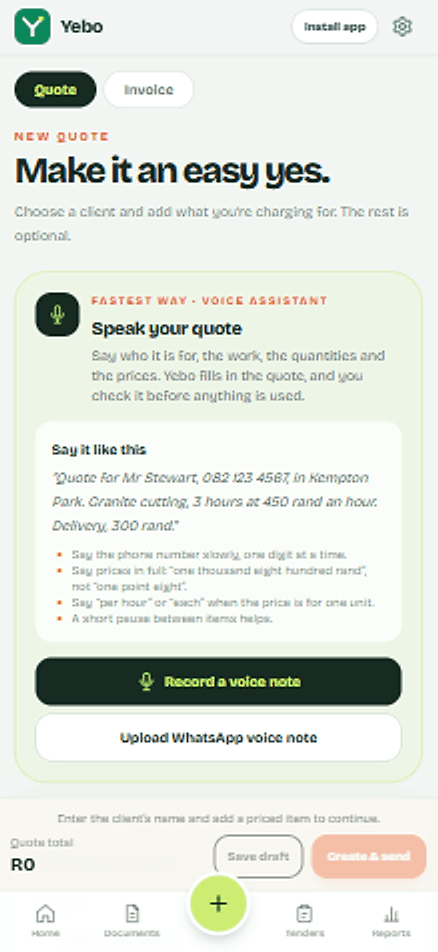
- Record a voice note with the client, the work and the prices. Yebo turns it into a draft you can edit. If a price looks wrong, like R1.80 where you meant R1 800, it warns you. Nothing is sent until you review it.
- 1 a month on The Side-Hustler, 5 on The Real Business, unlimited on The Industry King
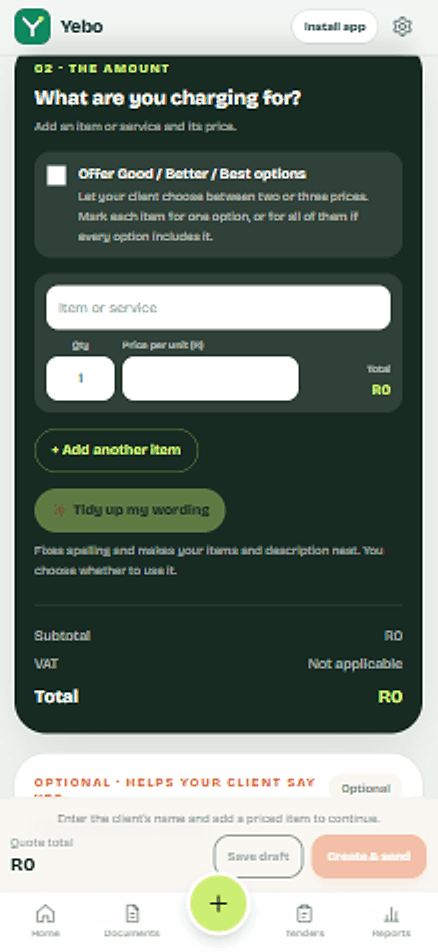
- Tidy up my wording
- Fixes spelling and tidies item lines, the job name and the description. You see before and after, and it never changes a number.
- Check before you send
- A short checklist flags a missing email or WhatsApp number, vague lines like “labour”, and items with no price. Each one has a button that takes you to the fix.
- Start from a similar job
- Quoting something you have done before? Yebo offers the items and wording from your last one, ready to change.
- Tips while you write
- Short suggestions on the quote screen: ask for a deposit on a big job, split one huge line into materials and labour, add a due date, name the job. You can dismiss any of them.
- Not included, assumptions and timeline
- Say what is outside the price and when work starts, so there are no surprises after the yes.
- Good, better, best
- Put options on one quote. Your client picks one and accepts it, and the invoice is made from the option they chose.
- Photos on the quote
- Add up to 6 photos of the site, the old unit or a sketch, so your client sees what you saw.
Send your first quote today.
Set up once with your logo and bank details. After that, each quote is a few minutes of work, and your client gets a clear page with a yes button and a way to pay.