Yebo
A smiling electrician in a white hard hat looking at the camera on a job site

Made for people who work with their hands

The first sharp quote wins the job.

Say the job out loud. Yebo turns it into a branded quote you can send on WhatsApp before you leave the driveway. See when it is opened, and get paid by card or instant EFT.

  • Carpenters
  • Electricians
  • Plumbers
  • Painters
  • Builders

Built by a working carpenter in Gauteng.

From R49 a month
Cancel any time
Card and instant EFT
Paid through your own PayFast account
No client sign up
They open a link on any phone
Installs on your phone
Free, no app store

Four ways quotes go wrong

You will recognise at least two.

  • The voice note price

    “Eish, it’s about R8 000, maybe R9, depends.” Your client heard “maybe” and phoned someone else.

    With Yebo: Speak it into Yebo. It comes out as an itemised quote with real numbers.

  • The Word document from years ago

    A stretched logo, three fonts and a table that breaks when you edit it.

    With Yebo: Your logo and colours on a page that looks like you mean business.

  • The “did you get it?” message

    Sent on Monday. Blue ticks on Tuesday. Nothing since.

    With Yebo: See when your client opens it, then follow up in one tap.

  • Remembering who owes you

    R12 000 is sitting in your head, and none of it is in your bank account.

    With Yebo: Outstanding and overdue money on your home screen every morning.

From first draft to invoice

One connected process, so the details you put in once carry through to the invoice.

  1. Step 1

    Create a quote

    Add the client, the job, the line items and the payment terms, or start with a voice note.

  2. Step 2

    Share one link

    Send it by email, copy the client link, or open a WhatsApp message that is ready to review.

  3. Step 3

    Get a decision

    Your client reads it online and accepts with their name, asks for a change, or says why not. You see every open and every answer.

  4. Step 4

    Make the invoice

    Turn the accepted quote into an invoice with a due date and your EFT details. Any deposit is credited for you.

01Write quotes

Write the quote in a few minutes

Say the job out loud, check the draft, send it.

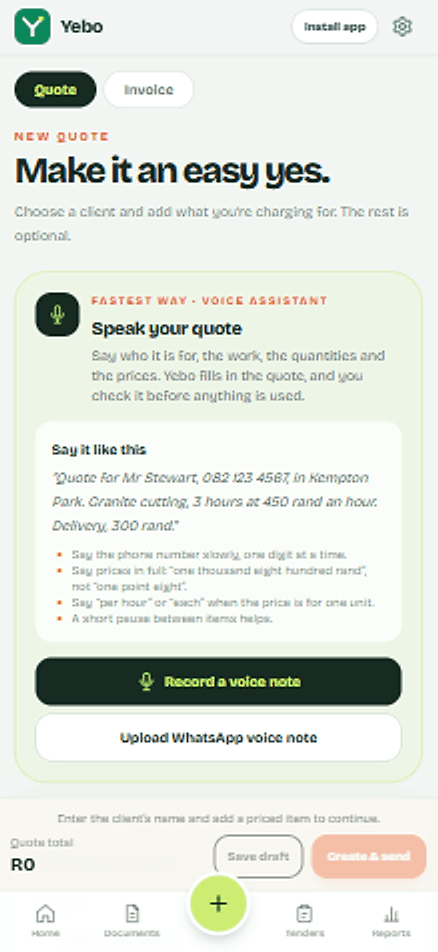
Voice quotes
Record a voice note with the client, the work and the prices. Yebo turns it into a draft you can edit. If a price looks wrong, like R1.80 where you meant R1 800, it warns you. Nothing is sent until you review it.
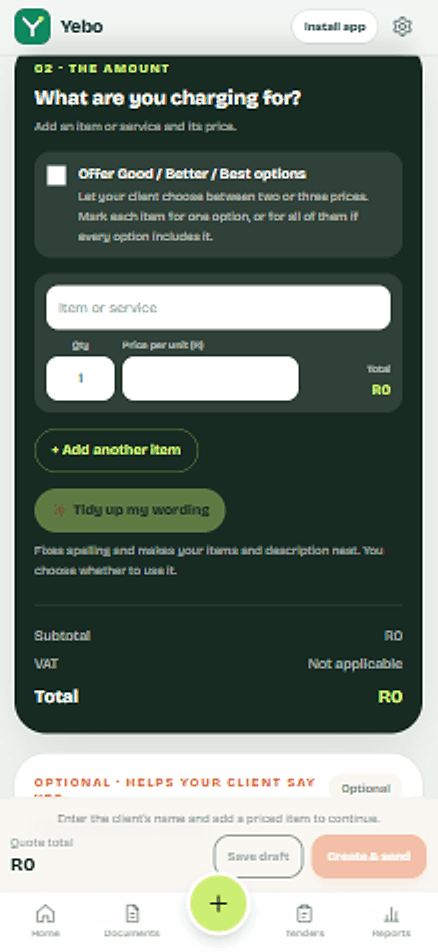
Tidy up my wording
Fixes spelling and tidies item lines, the job name and the description. You see before and after, and it never changes a number.
Check before you send
A short checklist flags a missing email or WhatsApp number, vague lines like “labour”, and items with no price. Each one has a button that takes you to the fix.
Start from a similar job
Quoting something you have done before? Yebo offers the items and wording from your last one, ready to change.
All 8 features: Write quotes
Yebo new quote screen with the voice assistant
Yebo quote items with quantities, unit prices, VAT and the total

02Send and track

Send it, then know what happens

You see when it is opened, and how your client answers.

WhatsApp or email
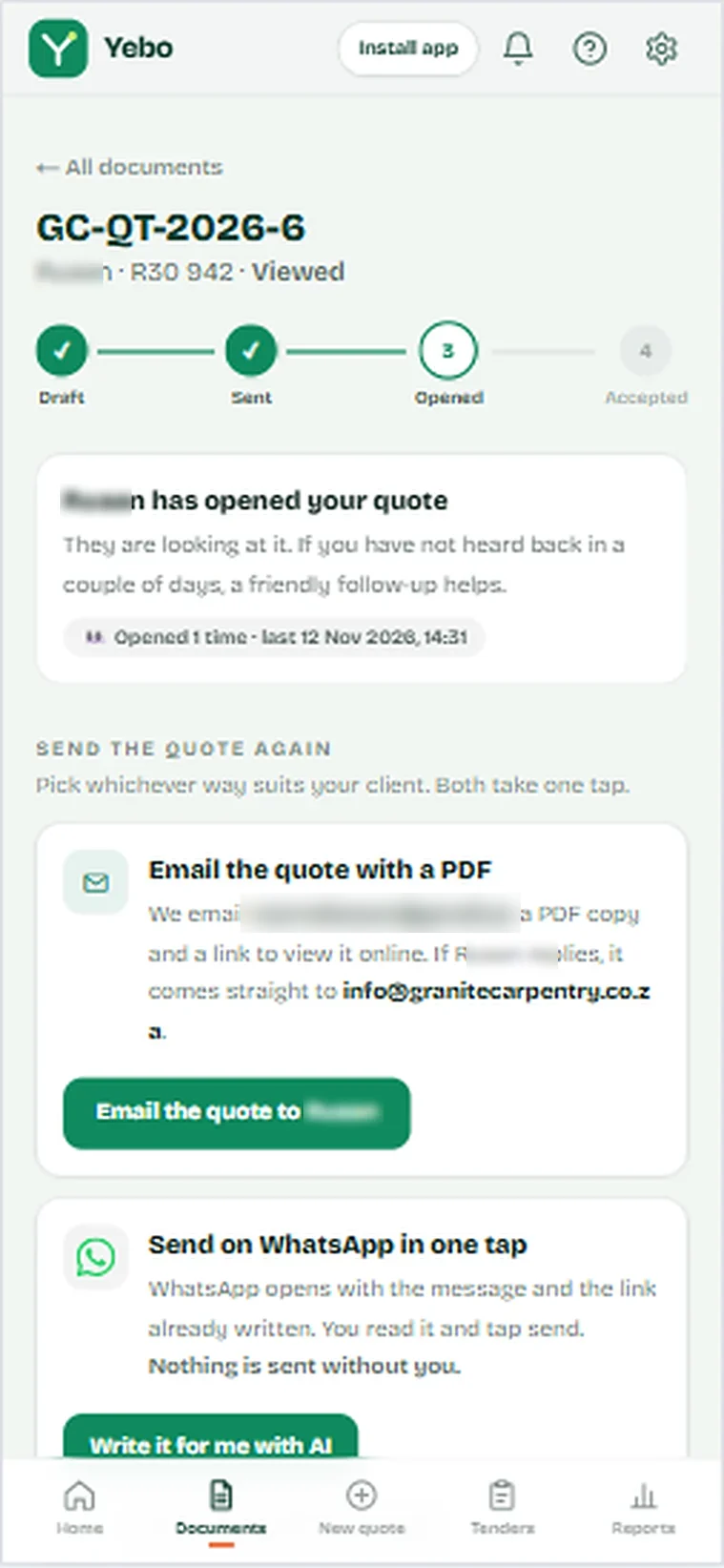
WhatsApp opens with the message written and you tap send. Email goes out with the PDF attached, and replies go to your business email.
Real “viewed” tracking
Link previews, robots and your own devices do not count. When Yebo says “Opened 3 times”, a person looked.
Accept with a typed name
Your client types their name to accept. It is saved as a signature on the page, the PDF and the email you get.
Ask for a change, or say no
Clients can ask for a change on the page, or decline and give a reason. They can undo a decline for 24 hours, and you can reopen a declined quote at any time.
All 7 features: Send and track
Yebo quote page showing the client has opened the quote, with ways to send it again by email or WhatsApp
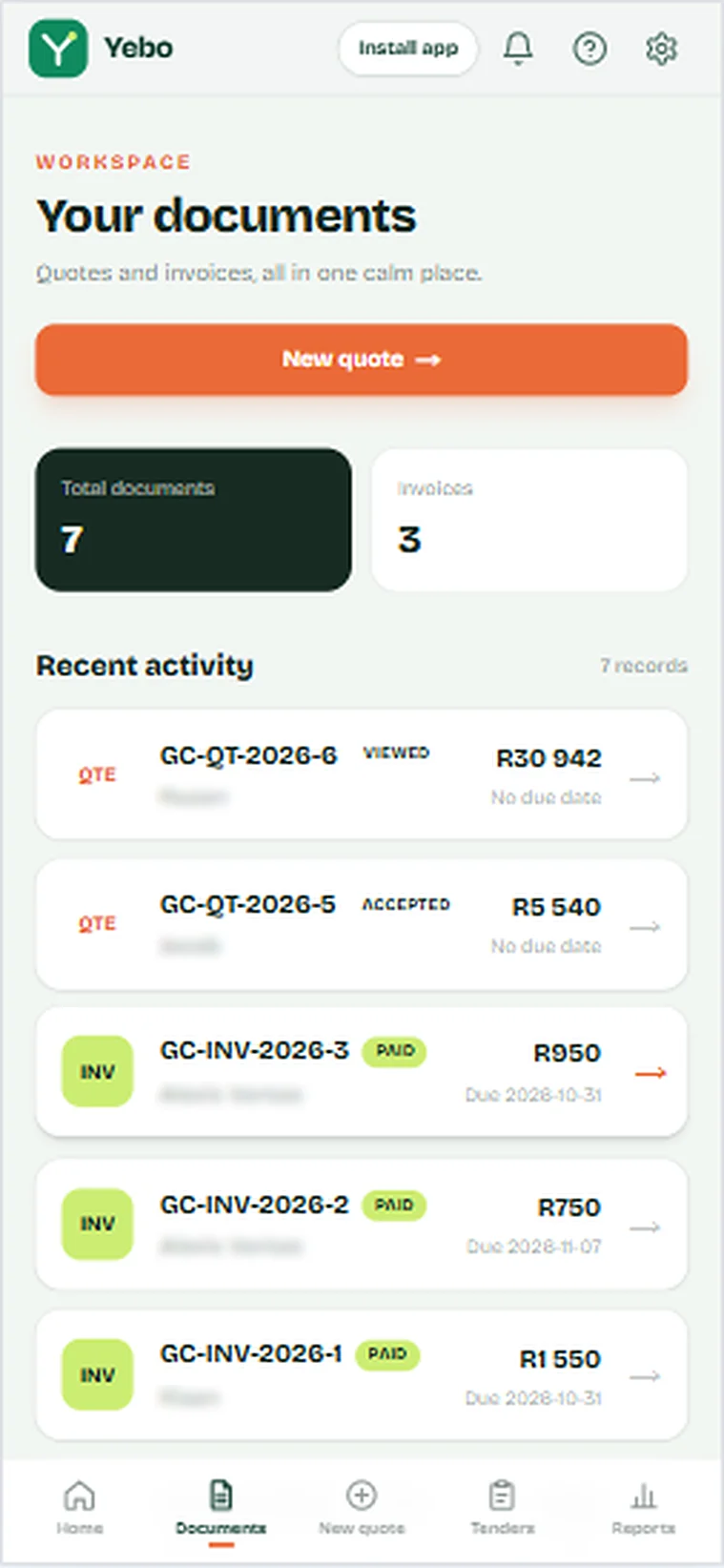
Yebo documents list with quotes and invoices and their status

03Get paid

Get paid without the awkward texts

Clients pay by card or instant EFT. You both get told.

Pay now, by card or instant EFT
A Pay now button on every invoice, through PayFast. An invoice is only marked paid when PayFast confirms the payment, never because someone landed on a thank you page.
Deposits
When a client accepts a quote that asks for a deposit, they see the exact amount to pay. The deposit is credited on the invoice, so they only pay the balance.
EFT, with proof
Your bank details sit on the page with copy buttons. Clients can tap “I have paid”, upload proof of payment, or promise a date. Reminders pause until that date.
Receipts and alerts
Your client gets a receipt by email. You get “You’ve been paid”, with the PayFast fee and what lands in your account, and a one tap WhatsApp thank you.
All 8 features: Get paid
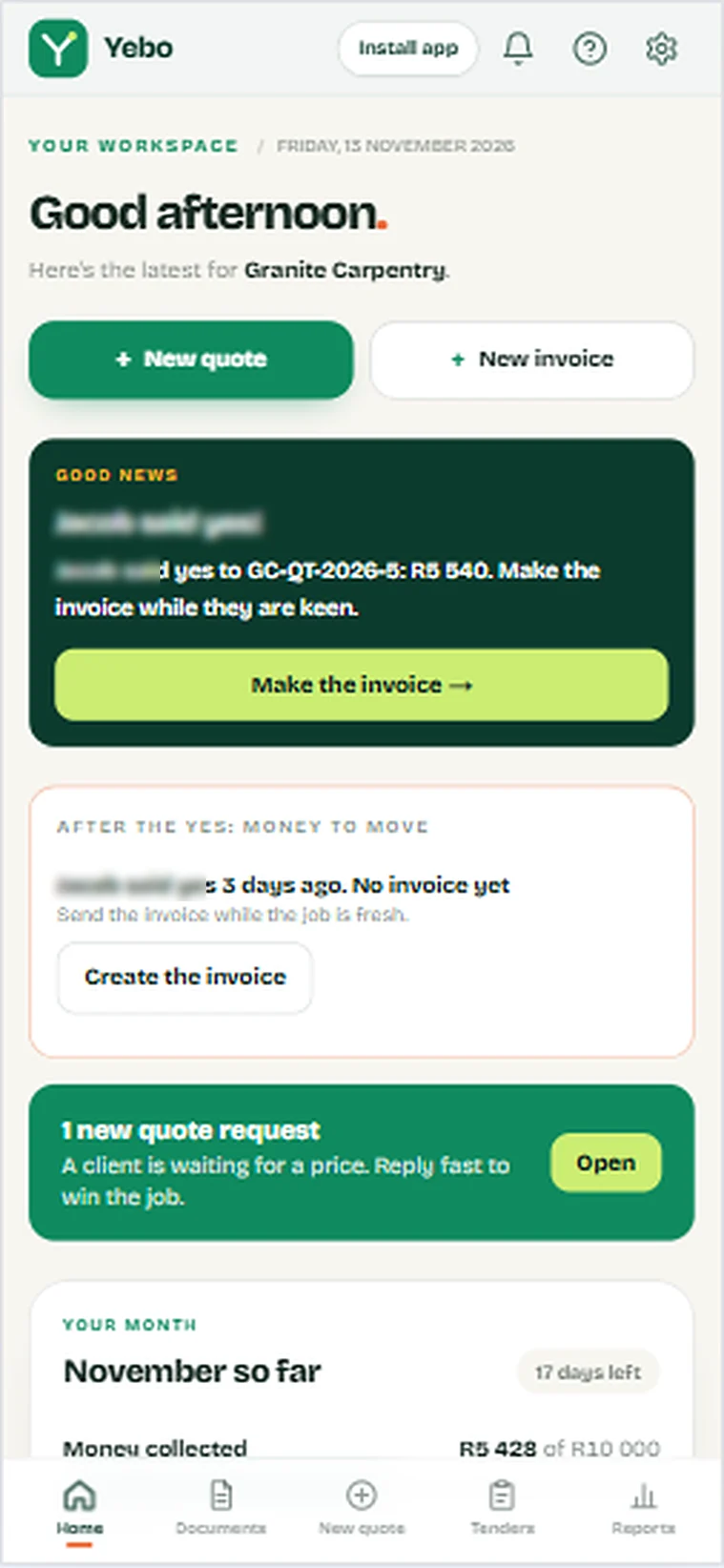
Yebo home screen: a client said yes to a quote, with a button to make the invoice
Yebo documents list showing paid invoices

04Your numbers

Know where the month stands

What is collected, what is owed, and why quotes are lost.

Home screen
Collected this month, outstanding and overdue, plus who has paid and what needs your attention today.
Monthly targets
Set a money target and a quotes target. See your progress, the days left, and a gentle suggestion for what to do next.
Quote results
How many quotes you win, what they were worth, and the reasons clients give when they say no.
VAT sales summary
Every invoice, or every payment, for any period, with the VAT on it, as a file for your accountant. It covers sales only. It is not a VAT201 return.
All 5 features: Your numbers
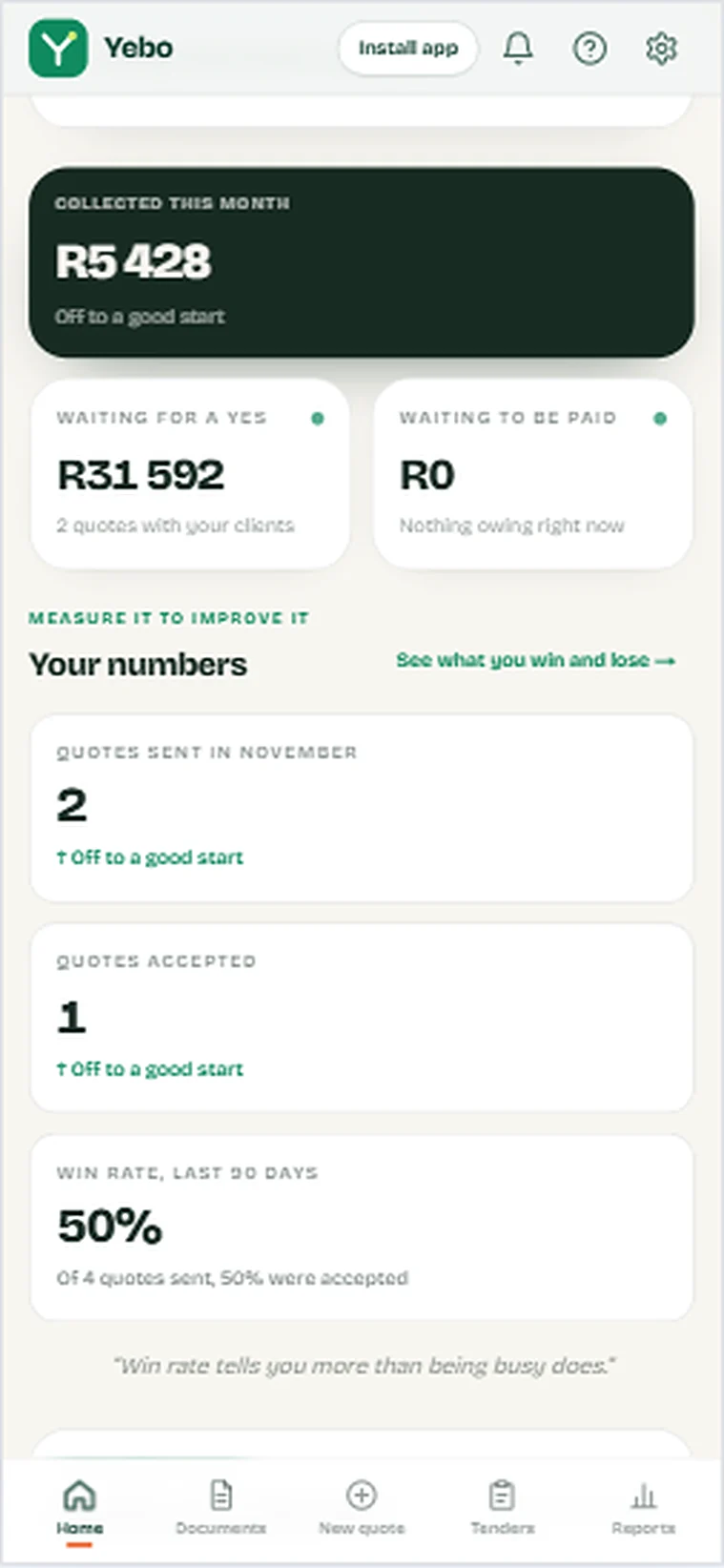
Yebo home numbers: money collected, waiting for a yes, quotes sent and win rate
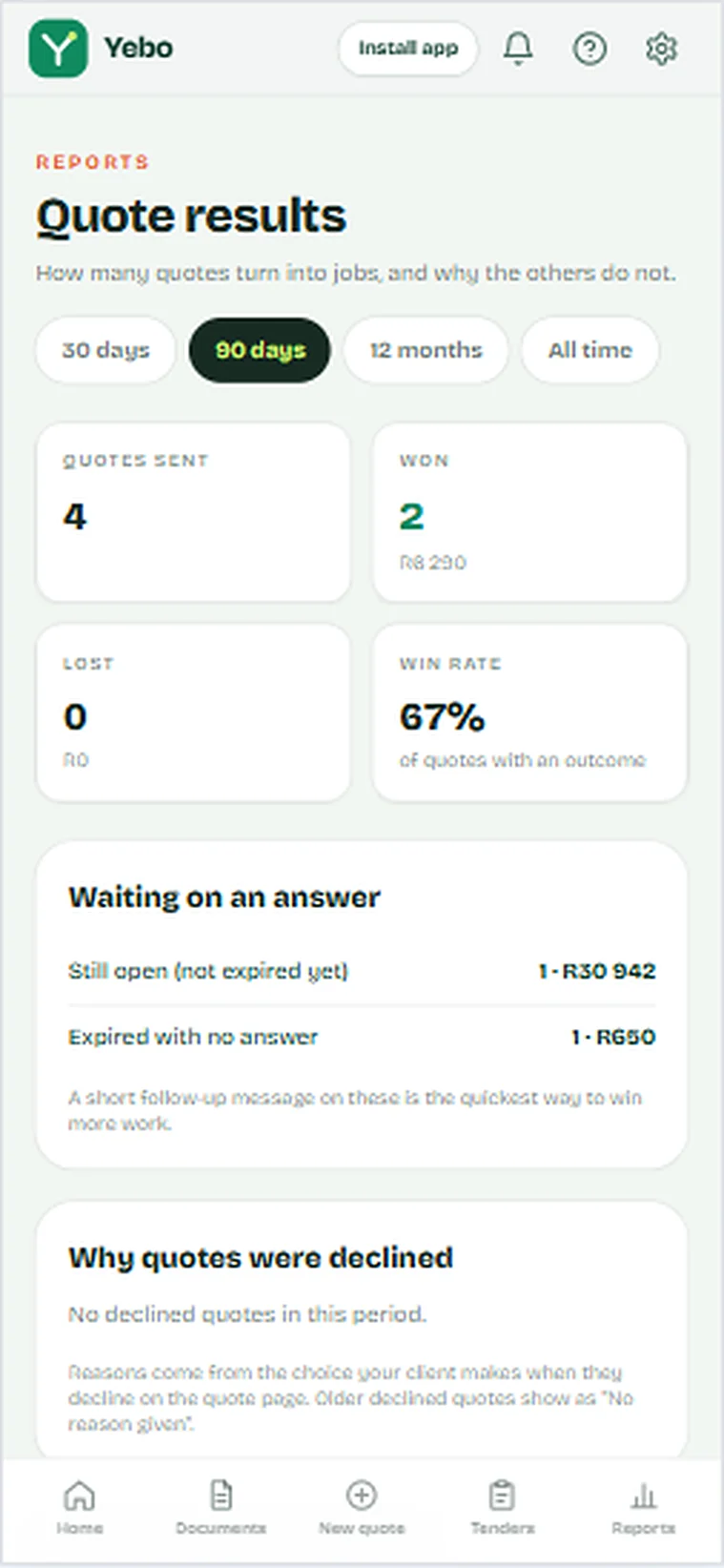
Yebo quote results: sent, won, lost and win rate

05Built for South Africa

Made for how South African trades work

Rands, VAT, EFT, PayFast and WhatsApp.

Rands and VAT
Amounts in rand. VAT is shown for VAT registered businesses and left out for the rest.
PayFast and EFT
Card and instant EFT through PayFast, plus manual EFT and cash that you can record yourself.
Bank details done properly
Pick your bank from a list of 16 and its universal branch code is filled in. You can still edit it.
WhatsApp first
Send, follow up and say thank you where your clients already are.
All 7 features: Built for South Africa
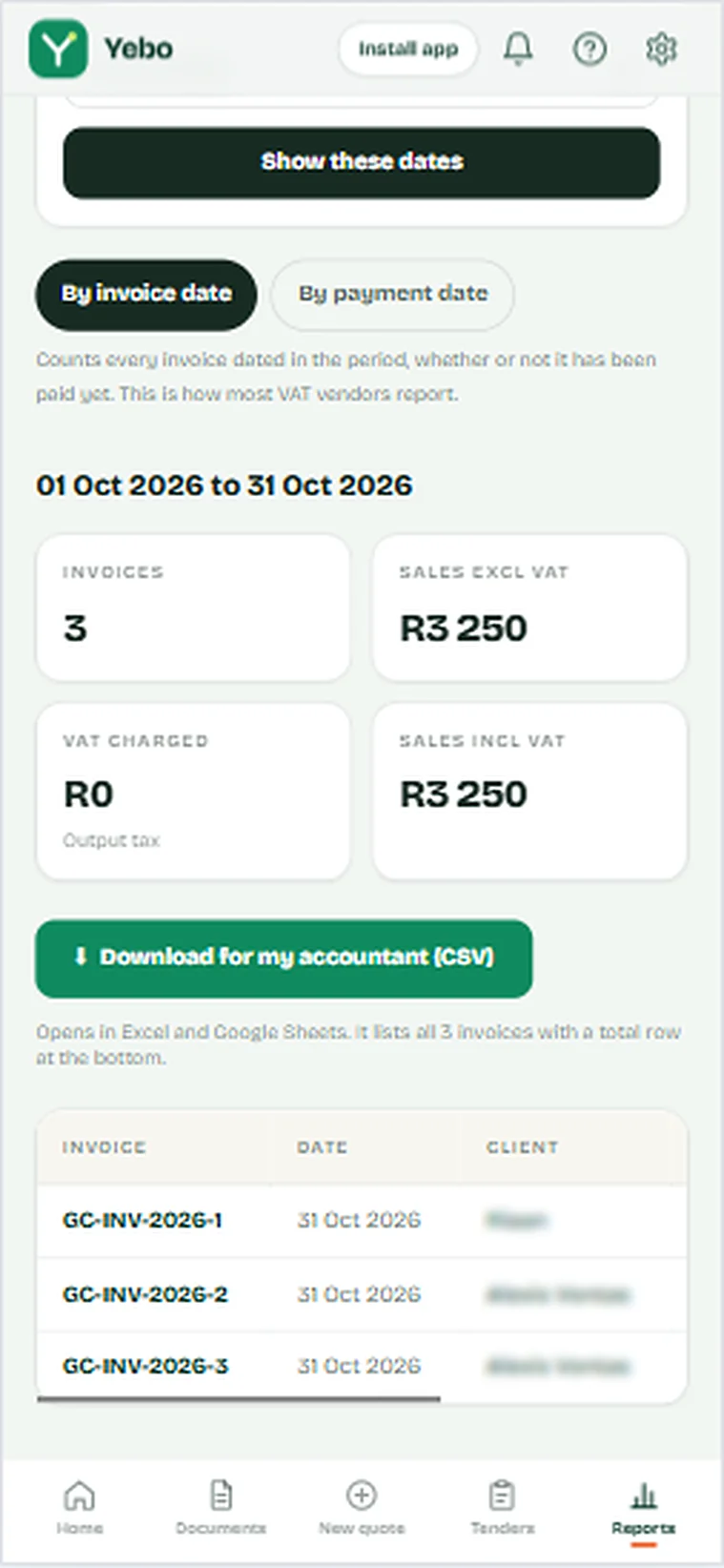
Yebo VAT report with a download for your accountant

Government tenders, without the paperwork panic

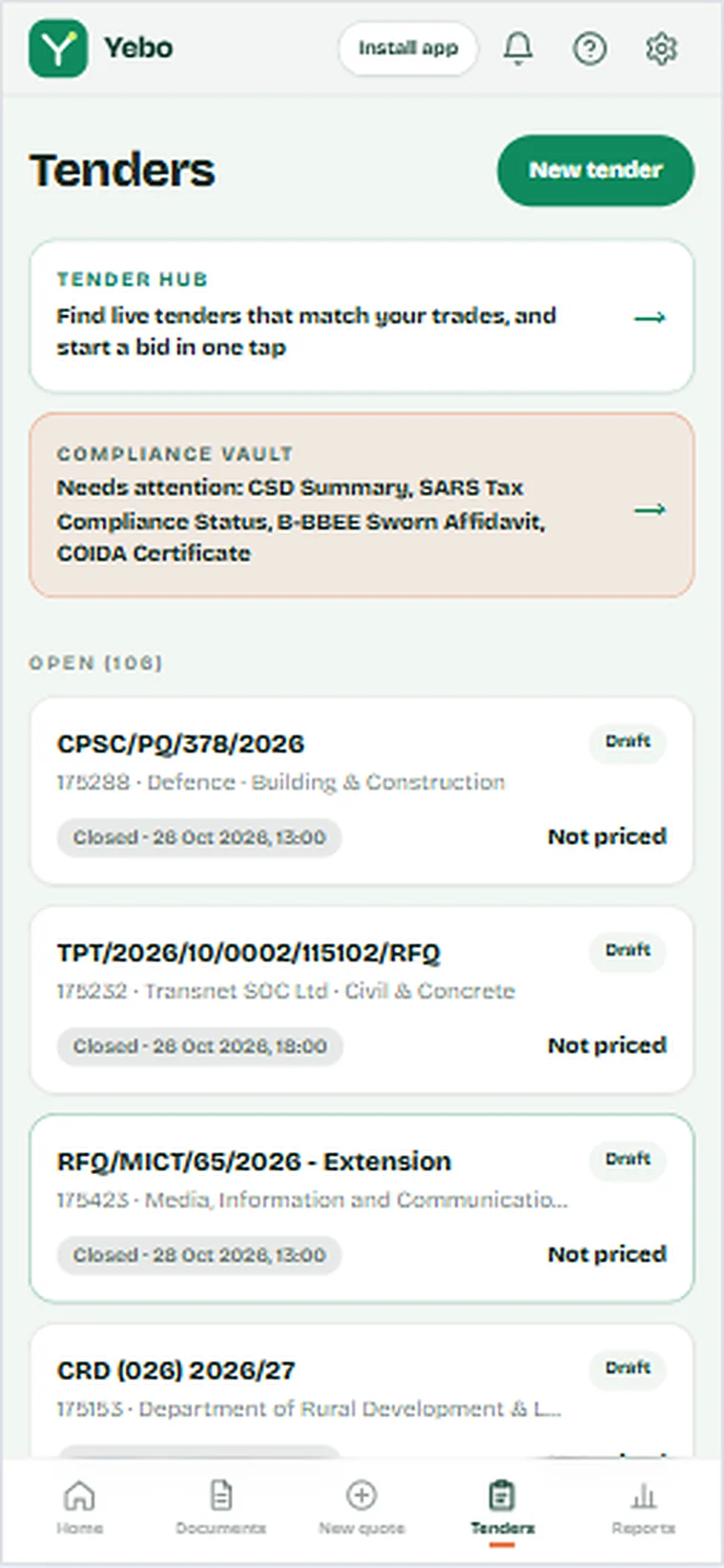
Live eTenders matched to your trade and province. Yebo reads the bill of quantities into lines, checks your CSD, SARS, B-BBEE and COIDA papers, and sends your bid in one email.

Tender hub
New tenders every morning, filtered to your trade and area. Closed ones disappear.
The BOQ, already typed
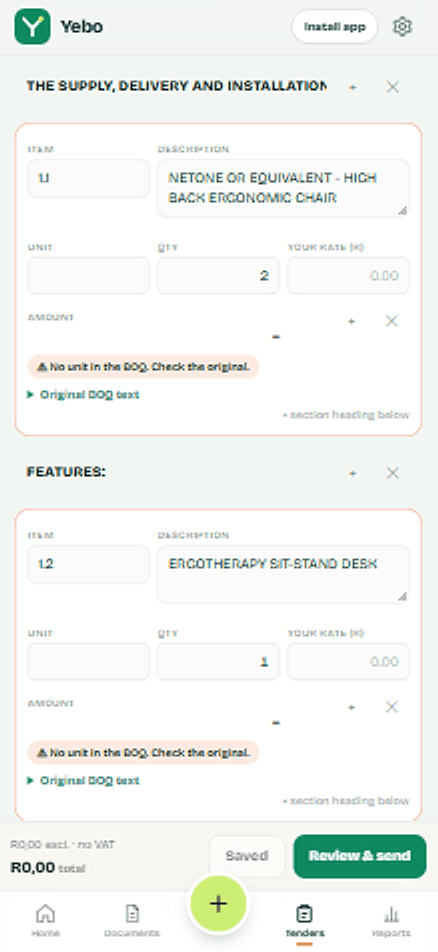
Excel BOQs are read exactly. PDFs are read by AI and anything unsure is marked, with the original text kept beside it.
Compliance vault
Your papers are checked for expiry, with a warning 14 days ahead and a link to where to get each one.
How to submit
The email or portal, the closing time and what to return, pulled from the tender documents.

You approve every bid. Yebo never sends one on its own. Part of The Industry King plan, R499 a month.

See how tenders work
Yebo tenders list with the tender hub, compliance vault and open bids
Yebo tender bid with the BOQ read into editable lines

The real app, on a real phone

Every screen here is a screenshot from Yebo.

  • Yebo home screen: a client said yes to a quote, with a button to make the invoice, plus new quote requests
    Know what to do nextA client says yes and Yebo puts the invoice one tap away.
  • Yebo home numbers: money collected this month, waiting for a yes, quotes sent and accepted, and win rate
    Measure it to improve itMoney collected, quotes sent and accepted, and your win rate.
  • Yebo quote page showing the client has opened the quote, with ways to send it again by email or WhatsApp
    See when they open itKnow your client has looked, then follow up at the right time.
  • Yebo documents list with quotes and invoices and their status: viewed, accepted and paid
    Quotes and invoices, one listEvery quote and invoice with its status, in one calm place.
  • Yebo quote results: quotes sent, won, lost and win rate, and why quotes are declined
    See what you win and loseHow many quotes turn into jobs, and why the others do not.
  • Yebo VAT report with invoices, sales, VAT charged and a download for your accountant
    Ready for your accountantA VAT summary for the period and a CSV your accountant can open.
  • Yebo tenders screen with the tender hub, compliance vault and open tenders
    Tenders for your tradeLive tenders for your trade, with your compliance papers checked before you bid.

A chatbot can write the quote. Then what?

General AI chat tools write words. After that you copy, paste, fix the formatting, send, chase, count, and wonder if anyone looked at it. Yebo does the rest of the job.

What a general AI chat tool does compared with Yebo
What you needA chatbotYebo
Writes the words of a quoteYesYes
Sends it to your client in one tap, by email or WhatsAppNoYes
Tells you the moment your client opens itNoYes
Lets your client accept it with one tapNoYes
Lets your client pay by card or instant EFTNoYes
Counts how many quotes you sent this monthNoYes
Shows your progress against a monthly targetNoYes
Reminds you who to follow up, and who owes youNoYes
Remembers your logo, bank details and clients onceNoYes

Compared with general AI chat tools used on their own, with no business connected to them.

“Business was busy this month” is a feeling. Numbers you can act on are better.

Yebo shows how many quotes you sent, how many you won and how much you collected, every month.

Yebo monthly targets screen with money collected, quotes sent and quotes won

Three plans, R49 to R499 a month

Pay monthly, cancel any time, and keep access until the end of the month you have paid for. Pick the plan that matches a normal month for your business. You can change it whenever you need to.

The Side-Hustler

R49per month

For the occasional job.

Making under R10 000 a month. Casual side-hustles, weekend handymen and anyone who is not busy yet.

  • Up to 10 quotes and invoices a month
  • 1 voice quote a month: speak it and Yebo fills it in
  • Send by email with a PDF, or on WhatsApp in one tap
  • See when your client opens, accepts or pays
  • Clients can pay online by card or instant EFT
  • Your logo and colours on every document
  • Monthly targets with a progress bar
  • 1 photo of your work on your quote link

Worth knowing: You get 1 voice quote a month. If you quote by voice often, The Real Business gives you 5.

The Real BusinessMost picked

R199per month

For steady monthly work.

Making R10 000 to R50 000 a month. Electricians, plumbers, solar installers and contractors with steady monthly work.

  • Up to 50 quotes and invoices a month
  • 5 voice quotes a month
  • Everything in The Side-Hustler
  • A daily list of clients to nudge, with one-tap WhatsApp and the message already written
  • All your clients and past quotes in one place
  • Up to 3 photos of your work on your quote link
  • Automatic email reminders to clients who go quiet

Coming soon, not included yet

  • Google reviews pulled in automatically
  • Automatic WhatsApp and SMS reminders

The Industry King

R499per month

For busy trade companies.

Making R50 000 or more a month. Established trade companies and high-volume contractors.

  • Unlimited quotes and invoices
  • Unlimited voice quotes
  • Everything in The Real Business
  • VAT sales summary for your accountant: every invoice and payment for any period, with the VAT on it, as a CSV file
  • Tender hub: live eTenders matched to your trade and province, with a draft bid opened for you
  • Tender engine: reads Excel and PDF BOQs into lines you can check and change, keeps your CSD, SARS, B-BBEE and COIDA papers valid, and emails the bid in one go
  • Up to 6 photos of your work on your quote link
  • Priority support and a one-to-one setup call

Coming soon, not included yet

  • Expense and input-tax tracking, to turn the VAT summary into a full VAT picture
  • Profit margin tracking
  • Multi-crew access
  • Google review capture

“Unlimited” plans are subject to fair use. Items marked as coming soon are not part of your plan yet.

The old way and the Yebo way

  • Writing it

    Old way: Fixing broken tables in Word or Excel at 9 PM.

    Yebo: Speak it, check it, send it from your phone.

  • How it looks

    Old way: Plain text or a document that looks like a hobby.

    Yebo: Your logo and colours on a clean page your client trusts.

  • Knowing where you stand

    Old way: No idea if they opened it or ignored it.

    Yebo: You see when it is opened, accepted and paid.

  • Getting paid

    Old way: Texting clients for money.

    Yebo: Clients pay by card or instant EFT. You get an alert, they get a receipt.

  • Chasing

    Old way: Trying to remember who owes you what.

    Yebo: A one tap reminder with the message already written.

Why Yebo is not free

  • You are the only one paying

    Free apps are paid for with your data or with ads. Yebo is paid for by the businesses that use it, so it works for them.

  • It costs money to run

    Every voice quote, PDF, email and secure payment has a cost. A fair monthly price keeps it fast and supported.

  • One paid quote covers it

    A quote that gets opened, accepted and paid on time more than covers a month.

Before you start

The questions people ask most before sending their first quote.

Try it yourself
Do my clients need an account?

No. They open a link on any phone, view the quote, accept it, and pay. There is nothing for them to install or sign up for.

Can I use it on my phone?

Yes. Yebo is built for phones, and you can add it to your home screen so it opens like an app.

What happens when I send a quote?

You choose email or WhatsApp. Yebo shows you straight away that it was sent, and tells you when your client opens, accepts or pays.

Where do my clients' replies go?

Straight to the business email you set up in Yebo, so nothing gets lost in a no-reply inbox.

How do I get paid?

Clients can pay your invoices online by card or instant EFT through PayFast, straight into your own PayFast account. You can also record EFT and cash payments yourself.

What if my client wants a change or says no?

They can ask for a change right on the quote page, or decline and choose a reason. You see it straight away, and you can reopen a declined quote and send a fixed version. The Quote results page shows your win rate and the most common reasons.

What if I made a mistake on an invoice?

Issue a credit note. It gets its own number and PDF, lowers what your client owes, and is not counted as income. It works on invoices that are not fully paid yet.

Does Yebo help me avoid sending a sloppy quote?

Yes. Before you send, a short checklist points out a missing email or WhatsApp number, vague lines such as “labour”, and unpriced items. You can also start from a similar job you quoted before.

Which plan should I pick?

Pick the one that matches a normal month for your business. If you are not busy yet, start with The Side-Hustler. If you quote every week, The Real Business is built for you. You can change plan any time.

Can I cancel?

Yes, any time, from Settings. You keep access until the end of the month you have paid for, and you will not be charged again.

Is my information safe?

Your information is stored securely and is never sold. You can read exactly what we collect and why in our Privacy Notice.


Send your first quote today.

Set up once with your logo and bank details. After that, each quote is a few minutes of work, and your client gets a clear page with a yes button and a way to pay.

Yebo quote screen with client name, WhatsApp, email and address fields